
 A few notes about the MacBook Neo | Riccardo Mori
https://morrick.me/archives/10286
I don’t care if the Neo lacks an ambient light sensor or if the webcam isn’t cutting-edge — It does not feature a notch on the top of the display and this is so huge for me. I thought Apple forgot that displays are supposed to be plain, uninterrupted, unblemished rectangles. Design-wise, this is currently the only Apple laptop I can look at and can think of purchasing after the 2020 M1 MacBook Air.

 “This Is Not The Computer For You” · Sam Henri Gold
https://samhenri.gold/blog/20260312-this-is-not-the-computer-for-you/
This computer is not for the people writing those reviews — people who already have the MacBook Pro, who have the professional context, who are optimizing at the margin. This computer is for the kid who doesn’t have a margin to optimize. Who can’t wait for the right tool to materialize. Who is going to take what’s available and push it until it breaks and learn something permanent from the breaking.
The invalid 68030 instruction that accidentally allowed the Mac Classic II to successfully boot Up
https://www.downtowndougbrown.com/2025/01/the-invalid-68030-instruction-that-accidentally-allowed-the-mac-classic-ii-to-successfully-boot-up/
This is the story of how Apple made a mistake in the ROM of the Macintosh Classic II that probably should have prevented it from booting, but instead, miraculously, its Motorola MC68030 CPU accidentally prevented a crash and saved the day by executing an undefined instruction.

 KH-C — Blitz through a MacBook battery using 'yes'
https://kevinhealyclarke.co.uk/blog/2025/10/blitz-through-a-macbook-battery-using-yes/
Here is the command to run:
yes > /dev/null &
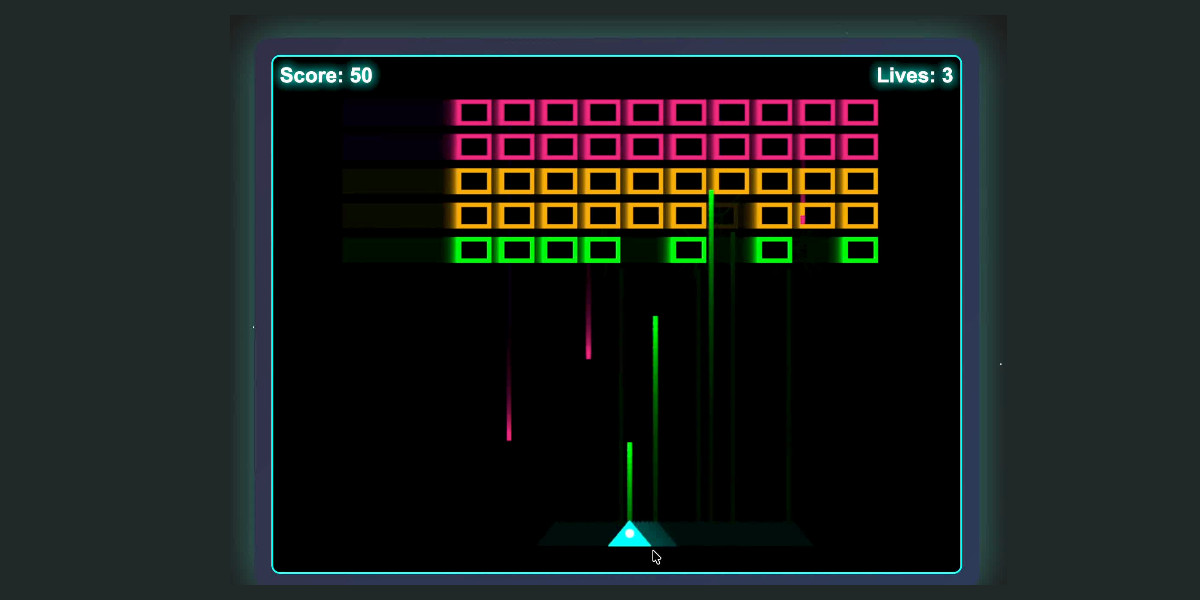
 My 2.5 year old laptop can write Space Invaders in JavaScript now, using GLM-4.5 Air and MLX
https://simonwillison.net/2025/Jul/29/space-invaders/
Two years ago when I first tried LLaMA I never dreamed that the same laptop I was using then would one day be able to run models with capabilities as strong as what I’m seeing from GLM 4.5 Air—and Mistral 3.2 Small, and Gemma 3, and Qwen 3, and a host of other high quality models that have emerged over the past six months.
 Run Your Own AI – AnthonyLewis.com
https://anthonylewis.com/2025/06/01/run-your-own-ai/
Here are some instructions that I shared with my co-workers. These are specifically for Macs with an M-series processor. On a PC, skip the steps about MLX and use Ollama to download a model. Then install the llm-llama plugin instead of llm-mlx.

 johnbean393/Sidekick: A native macOS app that allows users to chat with a local LLM that can respond with information from files, folders and websites on your Mac without installing any other software. Powered by llama.cpp.
https://github.com/johnbean393/Sidekick
A native macOS app that allows users to chat with a local LLM that can respond with information from files, folders and websites on your Mac without installing any other software. Powered by llama.cpp.
luchina-gabriel/OSX-PROXMOX: Voilà, install macOS on ANY Computer! This is really and magic easiest way!
https://github.com/luchina-gabriel/OSX-PROXMOX
Voilà, install macOS on ANY Computer! This is really and magic easiest way!
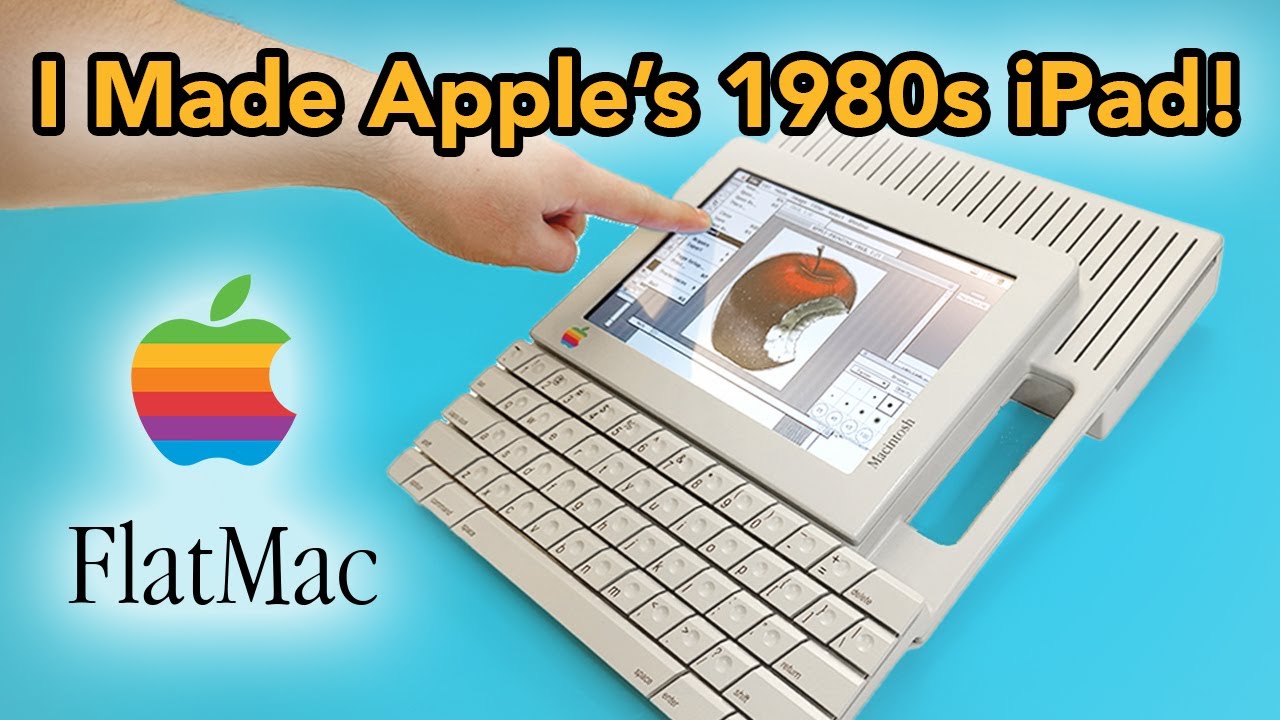
 I Built Apple’s 1980s iPad Concept! - YouTube
https://www.youtube.com/watch?v=Grd_a4oi7qU
This project has been a dream come true! As a designer, I've always been inspired by groundbreaking concepts, and this time, I challenged myself to recreate one of the most iconic and unrealized prototypes: Hartmut Esslinger’s Apple FlatMac.
 Apple Forces The Signing Of Applications In MacOS Sequoia 15.1 | Hackaday
https://hackaday.com/2024/11/01/apple-forces-the-signing-of-applications-in-macos-sequoia-15-1/
Many MacOS users are probably used by now to the annoyance that comes with unsigned applications, as they require a few extra steps to launch them. This feature is called Gatekeeper and checks for an Apple Developer ID certificate. Starting with MacOS Sequoia 15, the easy bypassing of this feature with e.g. holding Control when clicking the application icon is now no longer an option, with version 15.1 disabling ways to bypass this completely. Not unsurprisingly, this change has caught especially users of open source software like OpenSCAD by surprise, as evidenced by a range of forum posts and GitHub tickets.
 Infinite Mac
https://infinitemac.org/
Infinite Mac is a collection of classic Macintosh and NeXT system releases and software, all easily accessible from the comfort of a (modern) web browser.
 FloppyEMU HD20: Using a FloppyEMU emulated HD20 with my Macintosh Plus – David and Steve's Blog
https://www.savagetaylor.com/2020/03/29/booting-a-macintosh-plus-with-floppyemus-hd20-support/
Recently I pickup a few Macintosh Plus systems, so I’ve decided to play around with the FloppyEMU’s HD20 support with the hopes of writing some future blog posts for maxing out a Macintosh Plus. This guide will also work for the SE, Classic, Classic II, Portable, IIci, IIsi, or LC.
FloppyEMU HD20: Using a FloppyEMU emulated HD20 with my Macintosh Plus – David and Steve's Blog
https://www.savagetaylor.com/2020/03/29/booting-a-macintosh-plus-with-floppyemus-hd20-support
Recently I pickup a few Macintosh Plus systems, so I’ve decided to play around with the FloppyEMU’s HD20 support with the hopes of writing some future blog posts for maxing out a Macintosh Plus. This guide will also work for the SE, Classic, Classic II, Portable, IIci, IIsi, or LC.
 BlueSCSI
https://bluescsi.com/v2
Today we're continuing that mission with the announcement of the BlueSCSI v2!
 GIF Brewery
http://gifbrewery.com/
GIF Brewery lets you convert brief clips from your video files into GIFs. Whether you want to create the newest cat GIF or provide a preview of a longer video, GIF Brewery is for you.
GIF Brewery
http://gifbrewery.com
GIF Brewery lets you convert brief clips from your video files into GIFs. Whether you want to create the newest cat GIF or provide a preview of a longer video, GIF Brewery is for you.
 MacBook Pro Retina LCD interface board - by ROZSNYO | digital cinema devices
http://dp2mbpr.rozsnyo.com/
Currently this board is in production and we have units IN STOCK !
- pricing $149 (USD, per board) - includes free shipping by your choice (registered post, FedEx)
MacBook Pro Retina LCD interface board - by ROZSNYO | digital cinema devices
http://dp2mbpr.rozsnyo.com
Currently this board is in production and we have units IN STOCK !
- pricing $149 (USD, per board) - includes free shipping by your choice (registered post, FedEx)
 Thunderstrike - Trammell Hudson's Projects
https://trmm.net/EFI
Thunderstrike is the name for the Apple EFI firmware security vulnerability that allows a malicious Thunderbolt device to flash untrusted code to the boot ROM
 Pioneering in Linux -- Macbook Pro Retina: Changing the Resolution in Ubuntu
http://linuxmacbookproretina.blogspot.com/2013/01/changing-resolution-in-ubuntu.html
 Loper OS » How to Run HyperCard Under Emulation
http://www.loper-os.org/?p=658
If you want to try HyperCard yourself, you can download an archive containing a hard disk image with Mac OS 8 and HyperCard installed, plus the ROM image file needed for most emulators, here.
 Matt Parkinson » Blog Archive ReadyNAS TimeMachine Verification Issues » Matt Parkinson - It always seems impossible until it's done
https://www.mattparkinson.eu/readynas-timemachine-issues/
Every so often, when my laptop runs out of battery during a backup, I receive the following: “Time Machine completed a verification of your backups. To improve reliability, Time Machine must create a new backup for you.”
Matt Parkinson » Blog Archive ReadyNAS TimeMachine Verification Issues » Matt Parkinson - It always seems impossible until it's done
https://www.mattparkinson.eu/readynas-timemachine-issues
Every so often, when my laptop runs out of battery during a backup, I receive the following: “Time Machine completed a verification of your backups. To improve reliability, Time Machine must create a new backup for you.”
 Make a plug hub for your Macbook - the future needs fixing - sugru
http://sugru.com/us/gallery/make-a-plug-hub-for-your-macbook
I love my Macbook, but I hate connecting and disconnecting 5 cables over and over again when I need to leave my desk. sugru to the rescue!
 VC&G | Revisiting Hotline, the 1990s Internet BBS Platform
http://www.vintagecomputing.com/index.php/archives/972
Hotline was neat. It was basically like DIY AOL for Mac, and most installations were completely infested by pirates and warez.
 How to run Continuum (SubSpace) on a Mac - wonko.com
http://wonko.com/post/how-to-run-continuum-on-a-mac
In the past I've run Continuum in a VirtualBox VM, but that's a pain and it's not as fast as I'd like. This time I decided to see if I could get it running in Wine, which would make it easier to play, and faster as well.
It turns out a fellow calling himself spiffyguy on the SubSpace forums had already gotten this working!
 Thunderbolt Express Dock | Belkin USA Site
http://www.belkin.com/us/thunderbolt
With Thunderbolt™ Express Dock, all your drives, networking, input and output devices connect to the 8 ports on the back. It in turn connects to your laptop through 1 Thunderbolt port. In short, eight cables become one cable.
 [HOWTO] Apple Magic Mouse on 10.10 Maverick Meerkat - Ubuntu Forums
http://ubuntuforums.org/showthread.php?t=1612843
$ xinput set-float-prop "Apple Magic Mouse" "Device Accel Velocity Scaling" 2.0
 Shelf (computing) - Wikipedia, the free encyclopedia
http://en.wikipedia.org/wiki/Shelf_(computing)
The Shelf is an interface feature in NeXTSTEP and OPENSTEP, and is used as a repository to store links to commonly used files, directories and programs, and as a temporary "holding" place to move/copy files and directories around in the file system hierarchy. In Mac OS X, items may be dragged onto the sidebar area of the Finder while holding the Apple key, but these do not behave as placeholders and cannot be manipulated in the below manner.
 DragonDrop, from ShinyPlasticBag
https://shinyplasticbag.com/dragondrop/
Dragging and dropping is a great way to get stuff done on your Mac, but DragonDrop makes it even better. DragonDrop lets you set down what you're dragging, leaving you free to find your destination without worrying about keeping the mouse button held down.
DragonDrop, from ShinyPlasticBag
https://shinyplasticbag.com/dragondrop
Dragging and dropping is a great way to get stuff done on your Mac, but DragonDrop makes it even better. DragonDrop lets you set down what you're dragging, leaving you free to find your destination without worrying about keeping the mouse button held down.
 Postgres.app | the easiest way to run PostgreSQL on the Mac
http://postgresapp.com/
the easiest way to run PostgreSQL on the Mac
Postgres.app | the easiest way to run PostgreSQL on the Mac
http://postgresapp.com
the easiest way to run PostgreSQL on the Mac
 View Firefox page source in an external editor - Mac OS X Hints
http://hints.macworld.com/article.php?story=20110106101920874
To do this, you need to enter about:config in Firefox's URL bar, then accept the warning when prompted. In the Filter box, type source.editor, which will show you three variables. Double-click on view_source.editor.external first, to change its Value to true. Next, double-click on view_source.editor.path, which will drop down a small sheet in which you enter the path to your preferred editor. The path must be a full complete Unix-style path, and point to the actual executable (not the app bundle). So for Coda, I used:
 Marked - smart tools for smart writers
http://markedapp.com/#extras
Pick your favorite editor: Marked's flexible Markdown preview will show you the final output of your document as you work, and its writing tools make your life easier from concept to publish.
 (Re)installing PHP 5.3 on Mac OS X — justin hileman dot info
http://justinhileman.info/article/reinstalling-php-53-on-mac-os-x
So you develop PHP 5.3 on a Mac? Mebbe you, like me, are a fan of Symfony2? Then you might have noticed a few deficiencies in the pre-loaded version of PHP 5.3 on your computer. Here’s how to …
 inessential.com: Mac Text Editors and Navigation
http://inessential.com/2011/11/27/mac_text_editors_and_navigation
Unfortunately, there’s no standard for Go to Line in Mac text editors. Each editor does it differently, and they usually screw up at least one part of it so that it’s not-particularly-usable. (Which causes me to curse through my nose, throw one of the plush toys they permit me to have, and then run back to Mama Terminal for solace.)
 Stop Sharing Your Files When You Travel
http://www.readwriteweb.com/hack/2011/11/stop-sharing-your-files-when-y.php
I have been on the road a lot in the past several months, and one thing I keep seeing is that folks are over-sharing. I am not talking about putting up those ribald pictures on your Facebook account, or forwarding those questionable email "jokes." But literally sharing your computer's data files across the hotel (and some airports too). Here is what my Mac Finder looks like at a Hilton that I was at earlier in the week (you can see that I am connected to several of my fellow travelers' PCs):
 Growl 1.3 now available on the Mac App Store
http://www.tuaw.com/2011/10/03/growl-1-3-now-available-on-the-mac-app-store
 IRControl
http://www.staarcom.com/software/IRControl
What is it? This is a combined MacOS X Preference Pane and faceless background application (FBA) to receive and send Infrared signals (more...)
 automatic | coding.curious
http://codingcurious.com/automatic
Automatic allows you to set up subscriptions for virtually any content linked in RSS feeds: podcasts, videocasts, torrentcasts... Rule of thumb: if it ends in '-cast', you can get it with Automatic.
 Textual: IRC for Mac OS X
http://www.codeux.com/textual
Textual is a lightweight IRC client created specifically for Mac OS X. It was designed with simplicity in mind. Textual has taken the best of IRC and built it into a single client. Its easy-to-use functionality combined with scripting support makes it an ideal IRC client for novice to advanced users.
 Platypus | Sveinbjorn Thordarson
http://www.sveinbjorn.org/platypus
Platypus is a developer tool for the Mac OS X operating system. It can be used to create native, flawlessly integrated Mac OS X applications from interpreted scripts such as shell scripts or Perl and Python programs. This is done by wrapping the script in an application bundle directory structure along with an executable binary that runs the script.
 Port Map and TCMPortMapper
http://www.codingmonkeys.de/portmap/index.html
Did you ever feel the urge to map your networking ports using your Airport Basestation or a UPNP router? Did you ever want your application to be reachable from the internet, even in a home networking setup? Don't despair anymore. Port Map and TCMPortMapper are here!
 android-notifier - Project Hosting on Google Code
http://code.google.com/p/android-notifier
"This project sends notifications to a desktop computer when certain events happen on an Android device, such as the phone ringing, an SMS being received, or the battery running low. The notifications can be sent over Wifi, Bluetooth, or (in the future) USB. "
 modernity tumbling by - How to Use Good Old Games on Your Mac
http://blog.hypomodern.com/post/594049451/how-to-use-good-old-games-on-your-mac
"If you’re like me—a nostalgic 90s gamer—then you’ve probably looked at the ever-expanding catalog at Good Old Games with some envy. There they all are again, the classics! Betrayal at Krondor! Master of Orion! But you’ve grown up and moved on to a Mac. Well, envy no more; I’ve figured out a fairly straightforward path to get you some nostalgic gaming action… DOS gaming action, at least."
 Lallafa’s Blog » OpenCBM on Mac
http://lallafa.de/blog/opencbm-on-mac
"OpenCBM is a library and a set of command line tools that allow to control old Commodore IEC devices like the famous 1541 floppy disk drive. You can transfer disk image to and from old discs. As modern computers do not provide a IEC connector, OpenCBM allows to control adapters that attach to your PC. Older PCs use parallel port cables (like the XA1541 or XS1541) and newer ones use a USB adapter (XU1541 or XUM1541).
This pages shows you how to use OpenCBM on your Mac. As modern Macs only support USB connectors and no parallel ones, we focus on setting up the XU1541 or XUM1541 devices."
Lallafa’s Blog » D64QLPlugin
http://lallafa.de/blog/d64qlplugin
"A D64/D71/D81 DiskImage QuickLook Plugin for Mac OS X 10.5"
 Hack Brings Mac OS X to the Nokia N900 - PCWorld
http://www.pcworld.com/article/188271/hack_brings_mac_os_x_to_the_nokia_n900.html
"Finnish geek Toni Nikkanen has become the first person to successfully run Mac OS X--in this case, Mac OS X 10.3 "Panther" (released in 2003)--on a cell phone. The phone he managed to achieve this feat with - Nokia's N900 smartphone. Sadly the hack, which makes use of PowerPC emulator Pear PC, runs incredibly slowly."
 MCLIDE - Lisp IDE for Macintosh
http://mclide.in-progress.com
"MCLIDE is a double-clickable, stand-alone development environment that connects to a Lisp either locally or through the network. It's like a combination of Slime with a modern GUI based IDE."
 Apple - Support - Discussions - Changing modifier keys in keyboard ...
http://discussions.apple.com/thread.jspa?messageID=10091638#10091638
"Unplugging the dongle to my Logitech MX 1100 and then swapping my modifier keys worked. Just be sure to open the modifier keys window first."
 Snow Leopard broke Control and Caps Lock swapping
http://troyandgay.com/blog/2009/08/30/snow-leopard-broke-control-and-caps-lock-swapping
"The problem turned out to be related to the wireless USB hub for Logitech’s MX Revolution (and others?) mouse. If you unplug it before you change the Modifier Keys the changes do take effect. You can then plug the Logitech USB dongle back in and everything works fine. I tried every combination of plugging my keyboard into my computer but the Logitech dongle was plugged into the back of my display so I didn’t think to try it. Michael Richardson figured it out."
 M Cubed Software - Dev
http://www.mcubedsw.com/dev
"M3InstallController is a class that will warn users if they are running your application from a disk image and offer to install the application in their Applications folder."
 Text Anti-Aliasing - How to disable? | ActiveState Community Site
http://community.activestate.com/forum-topic/text-anti-aliasing-how-to
"defaults write com.activestate.Komodo AppleAntiAliasingThreshold 20"
 BootXChanger
http://namedfork.net/bootxchanger#downloads
"BootXChanger will allow you to change the boot image (the gray Apple) on Mac OS X 10.4 and 10.5"
 Meet iFixit: Mitra’s Upgrade Success Story « iFixit Blog
http://www.ifixit.com/blog?p=627
User serviceable parts inside depend on the user. Also, nice: "I used a cupcake baking pan to organize the screws as I took the laptop apart."
 Stainless for OS X Leopard
http://www.stainlessapp.com
"Although Stainless started out as a technology demo to showcase our own multi-processing architecture in response to Google Chrome, we've been inspired by our growing fanbase to forge ahead and craft Stainless into a full-fledged browser. In fact, Stainless now has features you won't find in Chrome or in any other browser."
 Porticus
http://porticus.alittledrop.com/index.html
"Porticus is a Cocoa GUI for the MacPorts package manager. MacPorts provides ready to build open-source software packages modified to compile and run on Mac OS X. The MacPorts project provides a TCL command line tool to manage installation, update and activation of the port packages. Porticus provides a GUI front-end to this tool."
 [unsanity] WindowShade X - Collapse, Minimize-In-Place your windows and more!
http://www.unsanity.com/haxies/wsx
 Upgrading Tivo With Your MacBook Pro(intel) and VMware's Fusion! | Winged Power Photography
http://www.wingedpower.com/archive/2008/02/upgrading-tivo-your-macbook-prointel-and-vmwares-fusion
"Okay, it's pretty much as involved as most other howto's, but using this method, you can use any Intel Mac computer with USB ports, to perform an upgrade of the Tivo drives, using the Linux-based tools. This means you will be able to make the most of your Tivo drives as well as being able to still surf the new and perform other tasks, during the hours that the drives are upgrading!"
 Tivo HD Hard Drive Upgrade (via Virtual Machine) at The Furrygoat Experience
http://www.furrygoat.com/2009/01/20/tivo-hd-hard-drive-upgrade-via-virtual-machine
"So, after doing some research on Google, I came across this fantastic post about Upgrading TiVo With Your Mac and VMWare Fusion. While the article describes the process for Series 1 and Series 2 boxes, I tried it this afternoon with my Series 3, and am happy to report I’m now humming along with 1TB of storage. All thanks to using virtual machines.Boom. I now can store 142 hours of HD, 1241 hours of SD."
 Pocket Gnome - WoW Bot for Mac
http://www.savorydeviate.com/pocketgnome
The real question, though, is will it play Progress Quest for me? "Pocket Gnome is a "bot" for World of Warcraft. Its goal is to make it easier to automate repetitive activities within the game; activities like moving around, killing monsters, looting, mining/herbing, skinning, and generally wasting your life waiting for your mana bar to refill. Pocket Gnome designed to do all of these things for you."
 Obscured Clarity: 500GB MacBook Harddrive Upgrade for Under $100
http://obscuredclarity.blogspot.com/2008/10/500gb-macbook-harddrive-upgrade-for.html
 Touching Firefox | edilee
http://ed.agadak.net/2008/10/touching-firefox
 JSCocoa — A bridge from JavascriptCore to Cocoa
http://inexdo.com/JSCocoa
"JSCocoa bridges Cocoa to JavascriptCore (WebKit's JS engine). It allows you to call C code, ObjC code, use C structs, and build Javascript classes inheriting from ObjC classes. "
 Technical Support - Mac: StarCraft and Diablo 2 fail to load
http://www.battle.net/forums/thread.aspx?FN=support&P=1&T=535843
"We've received a handful of reports from users with the newest (2-26-08) revision of the MacBook Pros and an inability to start up Diablo 2 and StarCraft. ... The StarCraft Startup Options and the Diablo 2 Options screens will appear, but after pressing Ok, the games close and do not load." Apparently, this is because a recent Leopard update removed 256 color display support from graphics drivers. Later in the thread, it seems that a patch is in the works by the heroic Mac team. Alternatives are Boot Camp or a dicey selective downgrade in graphics drivers from an earlier update.
 Frederic Sebton: Mamebook cocktail
http://fsebton.blogspot.com/2008/02/mamebook-cocktail.html
"I went to IKEA today and picked up a RAMVIK sideboard to turn the Mamebook into a proper Cocktail Cabinet."
Flickr Find: Macintosh on Nintendo DS - The Unofficial Apple Weblog (TUAW)
http://www.tuaw.com/2008/07/06/flickr-find-macintosh-on-nintendo-ds
"While browsing Flickr this afternoon, we came across a shot of a Nintendo DS running Macintosh System 6 in emulation on reader Ken Fager's Flickr stream."
 briksoftware's products
http://briksoftware.com/products/unplugged
"UnPlugged is an application to notify when the power cord of the Mac is unplugged or plugged in."
 MacMod.com - Your Mac Modification HQ - Powerbook to Desktop
http://www.macmod.com/content/view/1118/2
"It seemed a shame to throw out such a tough old machine because of a screen problem. So I decided to join the case modding fraternity."
 Splasm Software: Dasher
http://www.splasm.com/products/productdasher.html
"Wouldn't it be neat if Dashboard popped up by itself after a certain amount of system idle time?"
 Create RSS feeds from system log files | Mac Geekery
http://www.macgeekery.com/tips/create_rss_feeds_from_system_log_files
"With the advent of RSS readers that can use so-called “local feeds” for various reasons, it was inevitable that some code monkey would convert his 250K system.log file to RSS."
 Nullriver Software : Products : Connect360
http://www.nullriver.com/products/connect360
"Your Xbox 360 is capable of playing back your music and videos and viewing your digital photos. With Connect360, your Mac's ready to share."
 To Do Widget (for Mac OS X)
http://todo.philipefatio.com
"To Do is a lightweight and fast widget to manage tasks. Thanks to Mac OS X Leopard it integrates with iCal and Mail."
 Fluid - Free Site Specific Browser for Mac OS X Leopard
http://fluidapp.com
"Using Fluid, you can create SSBs to run each of your favorite webapps as a separate desktop application. "
 bbum’s weblog-o-mat » Blog Archive
http://www.friday.com/bbum/2008/01/10/silly-hack-of-the-day-mount-the-obj-c-runtime-as-a-filesystem
"The little app is called RuntimeFS and it contains a simple bit of code that traipses through the Objective-C runtime and collects information about the Objective-C classes encountered."
 View digital comic CBZ files using Quicklook
http://www.the8thsign.com/2007/11/19/view-digital-comic-cbz-files-using-quicklook
"Digital comic files come in two flavors, CBZ and CBR. They are just renamed ZIP and RAR files containing JPG files."
 MacNoteTaker Home Page
http://homepage.mac.com/wis/Personal/programs/NoteTaker/NoteTaker.html
"MacNoteTaker lets you write notes up to 32,676 long. It stores them in a hierachical structure with unlimited nested folders just like the files on your computer."
 WoWAceUpdater
http://www.lsmason.com/software/wowaceupdater
"Makes it easy to keep your Ace add-ons for World of Warcraft up-to-date on Mac OS X."
 ksuther.com | Warp
http://www.ksuther.com/warp
"Warp is a preference pane that allows you to use the mouse to switch between Spaces rather than using the keyboard."
blacktree-alchemy - Google Code
http://code.google.com/p/blacktree-alchemy
"This project contains the source to Quicksilver and (eventually) other related projects."
 Taskpaper Web
http://hogbaysoftware.com/products/taskpaper_web
"A web implementation of TaskPaper. Primarily designed as a lightweight viewer for documents you have created in TaskPaper. It also provides rudimentary editing facilities for quick edits on the move."
Taskpaper Vim
http://hogbaysoftware.com/products/taskpaper_vim
"This package contains a Vim syntax file and file-type plugin for the simple format used by TaskPaper"
Taskpaper
http://hogbaysoftware.com/products/taskpaper
"TaskPaper is a simple to-do list that's surprisingly adept. Unlike the competition, TaskPaper's text based interface offers you paper-like simplicity and ease of use."
 infinite-sushi.com - ecto3 alpha
http://infinite-sushi.com/software/ecto/news/2007/08/ecto3_alpha.php
"This release of ecto3 is an alpha-release. In other words, it has bugs and it has missing features that will be incorporated in later versions"
 Mark Bernstein: Tinderbox 4: using Markdown
http://markbernstein.org/Aug0701/Tinderbox4usingMarkdown.html
"Markdown for Tinderbox took about 10 minutes from download to done."
 VimPatches/GuiTab - Mac Vim
http://wiki.macvim.org/wiki/VimPatches/GuiTab
"This patch (version 7) was included in the official vim source as of 7.0.233 and will be in vim 7.1"
 LuaObjCBridge
http://www.pixelballistics.com/Wiki/index.php?page=LuaObjCBridge
"LuaObjCBridge is an Objective-C framework providing access to the Lua scripting language from within programs which use Apple's Cocoa framework."
ssh on iPhone - The Unofficial Apple Weblog (TUAW)
http://www.tuaw.com/2007/07/23/ssh-on-iphone
"once you've got ssh installed on your iPhone and active, you can access your iPhone from a shell on your Mac."
Sveinbjorn Thordarson's Website - Sloth
http://www.sveinbjorn.org/sloth
"Sloth is a program that displays a list of all open files in use by all the applications your user account is running on the system -- this list includes IP and Unix sockets, character devices and directories."
 The Omni Mouth » OmniGraffle for Bureaucracy
http://blog.omnigroup.com/2007/03/09/omnigraffle-for-bureaucracy
"OmniGraffle might not be the first thing that comes to mind when you need to fill out some official forms for the U.S. Government. Or, say, some character sheets for your weekend Dungeons & Dragons session. But it should be."
 The Firefox computer ? Toni’s Garage
http://toni.schneidersf.com/2007/02/09/the-firefox-computer
"I want a Firefox computer. A nice, sleek, solid state notebook with a big screen that you open up and it just runs Firefox"
 Daring Fireball: Using Dynamic Scripting Languages for Mac OS X Application Development
http://daringfireball.net/2007/02/dynamic_scripting_languages
"There’s been a lot of interesting discussion over the last week regarding the use of dynamic scripting languages for programming desktop applications."
 SMK-88 Compact Mac Keyboard | DS International
http://www.notestation.com/smk-88.htm
"The Compact Mac Keyboard comes with 2 USB plug-in connectors: a 1.1 USB connector and an optional 2.0 USB connector."
Happy Hacking Keyboard Coming to the Mac - The Unofficial Apple Weblog (TUAW)
http://www.tuaw.com/2007/01/26/happy-hacking-keyboard-coming-to-the-mac
"Seriously, though, how can you not want a happy hacking keyboard?"
 bit-tech.net | Unofficial iToilet mod
http://www.bit-tech.net/news/2005/06/10/itoilet_mod
"Taking full advantage of the Mac Mini's compact dimensions and white exterior, they modded the diminutive OSX box into a toilet paper dispenser."
 Cult of Mac - Learn New Humility: Play "Go" On Your Mac
http://blog.wired.com/cultofmac/2006/12/learn_new_humil.html
"It's sort of like playing a really evil version of Othello that requires the use of more strategies and gambits than chess."
 Ryan Tomayko - Parallels Makes IE Testing Suck Less, Melts Power Cord
http://naeblis.cx/weblog/2006/12/23/parallels-makes-ie-suck-less
"The bad news is that after about ten minutes of running with both VMs open, I started to smell burning electronics."
 Ambrosia Software, Inc. -- games/SketchFighter 4000 alpha
http://www.ambrosiasw.com/games/sketchfighter
"SketchFighter 4000 Alpha redefines "retro" by bringing together the imaginative pen and paper sketches from your youth with a killer resolution independent OpenGL graphics engine."
 Cocoa Source Code - A Simple HTTP Server
http://culturedcode.com/cocoa
"SimpleHTTPServer listens to port 50000, uses the path of the request-URL to construct a new URL by inserting "http://" at the beginning, loads this new URL and renders its contents to a PDF file."
 MacDevCenter.com -- How to Write a Cocoa Web Server
http://www.macdevcenter.com/pub/a/mac/2006/11/14/how-to-write-a-cocoa-web-server.html
"there are some rather useful ... Cocoa classes that are most helpful for writing a web server. In this article I will show you what they are and how to use them."
smcFanControl
http://homepage.mac.com/holtmann/eidac/index.html
Damn, this thing reduces the machine's temperature dramatically. I could feel it cool down under my hand. "smcFanControl lets you control your fans manually to make your macbook(pro) run cooler. "
 Coffee & Cocoa - Blog Archive - Objective-C 2.0, Java and Annotations
http://www.martinkahr.com/2006/09/01/objective-c-20-java-and-annotations
"With Leopard Objective-C 2.0 will be introduced. It gets features to make it more attractive and easier for developers who are new on the platform"
 MAKE: Blog: High(er) Rez screen swap on a Powerbook
http://www.makezine.com/blog/archive/2006/08/higher_rez_screen_swap_on_a_po.html?CMP=OTC-0D6B48984890
"This clever Maker swapped out the LCD screen in a 15" Powerbook with a higher resolution (1920 x 1200 display) - it should work in a new Macbook pro, and doesn't require soldering, just assembly."
 Macworld: Mac OS X Hints: Play with GUI scaling
http://www.macworld.com/weblogs/macosxhints/2006/08/guiscale/index.php?lsrc=mwrss
"Have you ever wished one of your applications could take up just a little less room onscreen?"
 Flip4Mac - Press Releases
http://www.flip4mac.com/pr_06_07_28.htm
"Release highlights include universal support for Apple’s Intel-based Macintosh systems and significantly faster Windows Media encoding for PowerPC Mac users."
 The Tao of Mac - blog/2006-07-04
http://the.taoofmac.com/space/blog/2006-07-04
"Since it's the 4th of July and everyone is relaxing anyway, I thought I'd do something different regarding the Mark/Ubuntu/Cory thing:"
 visor:visor [docs]
http://docs.blacktree.com/visor/visor
"Visor provides a systemwide terminal window accessible via a hotkey, much like the consoles found in games such as Quake."
 Macworld UK - Rip your iPod video with an Xgrid app
http://www.macworld.co.uk/news/index.cfm?NewsID=14903&RSS=
"Xgrid allows a user to combine the processing power of multiple Macs across a network for batch encoding of video"
 Mindjet MindManager 6 Mac
http://www.mindjet.com/us/products/mindmanager_6_mac?s=6
"The power of mapping has finally reached the Mac!"
 13-Inch MacBook Benchmarks 1
http://www.creativemac.com/articles/viewarticle.jsp?id=43717
"in the vast majority of tests, the MacBook beat out the desktop system and certainly proved itself competition for all but the highest-end (G5 Quad) Mac systems on the market today."
 YouTube - Macworld - MacBook Battery Bay (2)
http://www.youtube.com/watch?eurl=http://www.macworld.com/weblogs/macword/2006/05/macbookvideo/index.php?lsrc=mwrss&v=8c6ckjy-gdY
"Macworld magazine takes you inside the MacBook's battery bay to discover where the RAM slots and hard drive live."
 Project X
http://www.projectx.com/home.html
I almost thought this was Tinderbox at first, from the screenshots. "Project X will forever change the way you manage projects."
 decaffeinated archives :: Submit, publish, comment, rinse, repeat
http://decaffeinated.org/archives/2006/05/04/hints
"So why isn't MacOSXHints a wiki?"
 David Weiss: A Tour of Microsoft's Mac Lab
http://davidweiss.blogspot.com/2006/04/tour-of-microsofts-mac-lab.html
"The Mac Lab is about 2000 square feet of solid computers."
 Macstravaganza at Microsoft - Gizmodo
http://gizmodo.com/gadgets/pcs/macstravaganza-at-microsoft-168789.php
"If you've ever fantasized about what 150 Mac Minis might look like, well, you really are a bigger dweeb than wed thought and were so totally never going to go out on a date with you, so stop asking already!"
Daring Fireball: Initiative
http://daringfireball.net/2006/04/initiative
"Last week I left my full-time job at Joyent, for the sole reason so that I can write Daring Fireball as a full-time job."
 icculus.org/quake3: Home
http://icculus.org/quake3?page=home
"This project, icculus.org/quake3 (sometimes referred to ioquake3, or ioq3 for short) aims to build upon id Software's Quake 3 source code release."
 GEEKS.OPML.ORG : How to prepare Mac icons for OPML nodetypes
http://geeks.opml.org/2006/03/07#a767
"I'm taking notes here as I prepare the icons for the "include" nodetype."
 Cocoa, JSON & Turbogears
http://toxicsoftware.com/blog/index.php/weblog/entry/cocoa_json_turbogears
"This post discusses how to use Cocoa to communicate with Turbogears powered web-applications."
 blakeseely.com - Blog » Blog Archive » +[NSDictionary dictionaryWithJSONString:]
http://blakeseely.com/blog/archives/2006/02/06/nsdictionary-dictionarywithjsonstring
"...since JSON is basically a series of key-value pairs, it would be a good match for NSDictionary - and it should be easy to create a dictionary out of a JSON string."
 Sci-Fi Hi-Fi - Blog Archive JSON is so hot right now!
http://weblog.scifihifi.com/2006/02/07/json-is-so-hot-right-now
"Awhile ago it dawned on me that JSON bears more than a passing resemblance to old-school NeXT plists, and that it would be pretty natural to write an NSDictionary category that could deserialize a JSON string into a Cocoa object graph."
 Brewed Fresh Daily » My NetNewsWire - del.icio.us applescript » Opinions, news and events from Cleveland, Ohio
http://www.brewedfreshdaily.com/2006/01/29/my-netnewswire-delicious-applescript
"Here’s what I’m using to send stuff from NNW to my del.icio.us account"