
 Introducing the Safari MCP server for web developers | WebKit
https://webkit.org/blog/18136/introducing-the-safari-mcp-server-for-web-developers/
In Safari Technology Preview 247, we’re introducing the Safari MCP server — a Model Context Protocol server for web developers that makes your web development and debugging workflow faster and more powerful. We know agents are increasingly integral to the coding process and the Safari MCP server gives your agent the ability to know how your code actually renders in the browser by connecting it to a Safari browser window.
 WebMCP
https://webmcp.dev/
WebMCP is an open source JavaScript library that allows any website to integrate with the Model Context Protocol. It provides a small blue widget in the bottom right corner of your page that allows users to connect to and interact with your webpage via LLM or agent.
 Model Context Protocol Server - Home Assistant
https://www.home-assistant.io/integrations/mcp_server/
The Model Context Protocol is an open protocol that standardizes how applications provide context to LLMs. The Model Context Protocol Server (MCP) integration enables using Home Assistant to provide context for MCP LLM Client Applications. For example, you can control your lights from Claude Desktop
 theredsix/agent-browser-protocol: Browsers are async. Agents are synchronous. ABP turns continuous browsing into discrete, atomic steps—so LLMs can reason about the web without racing against it.
https://github.com/theredsix/agent-browser-protocol
ABP is a Chromium build with MCP + REST baked directly into the browser engine.

 Interactive tools in Claude | Claude
https://claude.com/blog/interactive-tools-in-claude
Starting today, you can open and interact with tools in Claude. Build and update project timelines in Asana. Draft, edit and send Slack messages in a formatted preview. Visualize ideas as diagrams in Figma—all without switching tabs.

 Introducing Wassette: WebAssembly-based tools for AI agents - Microsoft Open Source Blog
https://opensource.microsoft.com/blog/2025/08/06/introducing-wassette-webassembly-based-tools-for-ai-agents/
The Azure Core Upstream team is happy to introduce Wassette: a security-oriented runtime that runs WebAssembly Components via Model Context Protocol (MCP). Wassette allows agents to autonomously fetch WebAssembly (Wasm) Components from Open Container Initiative (OCI) registries and execute them as needed. It’s built on the Wasmtime runtime, offering secure sandboxing on par with modern browser engines. To enhance security, Wassette includes a fine-grained, deny-by-default permission system, allowing interactive control over access to system resources.
Traves-Theberge/Tarot-Mcp-Typescript: A Typescript-based MCP (Model Context Protocol) server for tarot card readings
https://github.com/Traves-Theberge/Tarot-Mcp-Typescript
A TypeScript implementation of a Model Context Protocol (MCP) server that provides tarot card reading functionality for AI assistants like Claude in Cursor.
junebash/swift-tarot-mcp: A Swift-based MCP (Model Context Protocol) server for tarot card readings
https://github.com/junebash/swift-tarot-mcp
A Model Context Protocol (MCP) server that provides tarot card reading functionality. This server allows AI assistants to draw tarot cards, perform multi-card readings, and access the complete tarot deck.
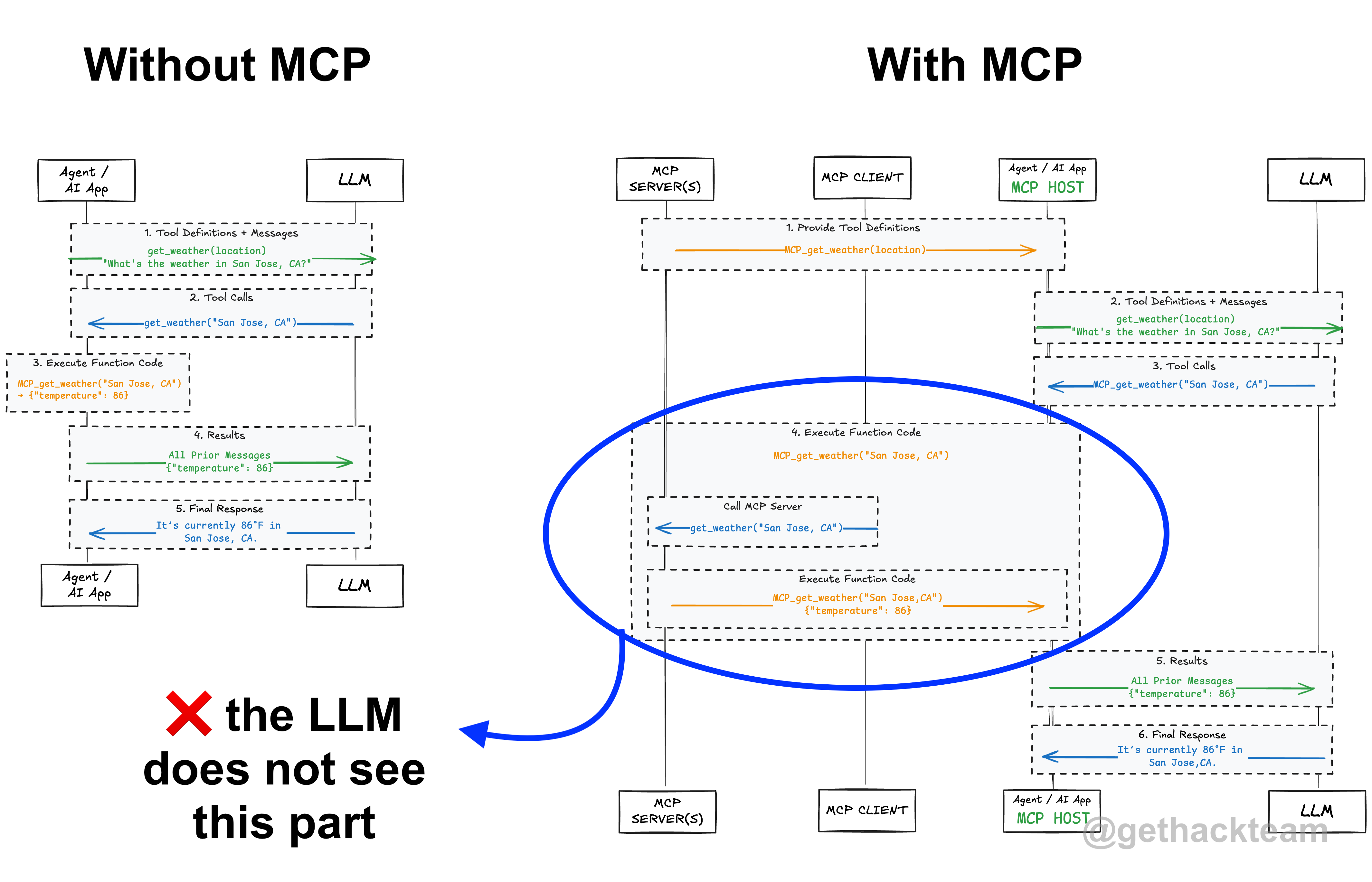
 Hackteam - An LLM does not need to understand MCP
https://hackteam.io/blog/your-llm-does-not-care-about-mcp/
Model Context Protocol (MCP) has become the standard for tool calling when building agents, but contrary to popular belief, your LLM does not need to understand MCP. You might have heard about the term "context engineering"; where you, as the person interacting with an LLM, are responsible for providing the right context to help it answer your questions. To gather this context, you can use tool calling to give the LLM access to a set of tools it can use to fetch information or take actions.
 Tools: Code Is All You Need | Armin Ronacher's Thoughts and Writings
https://lucumr.pocoo.org/2025/7/3/tools/
In my view, MCP suffers from two major flaws:
It isn’t truly composable. Most composition happens through inference.
It demands too much context. You must supply significant upfront input, and every tool invocation consumes even more context than simply writing and running code.
 TIL: Using Playwright MCP with Claude Code
https://simonwillison.net/2025/Jul/1/using-playwright-mcp-with-claude-code/#atom-everything
I decided to figure out how to use the official Playwright MCP server with Claude Code.
It turns out it's easy:
claude mcp add playwright npx '@playwright/mcp@latest'
claude
tuananh/hyper-mcp: Model Context Protocol on steroids ;)
https://github.com/tuananh/hyper-mcp/tree/main
Model Context Protocol on steroids ;)
 Notes on MCP - Tao of Mac
https://taoofmac.com/space/notes/2025/03/22/1900
Right now, I’m not overly excited by MCP over “standard” tool calling. I much prefer agents.json and the concepts around endpoint discovery, which feel much more natural if you are working with APIs.